DocsUsing Hex1 min read
Projects
Shared instructions, knowledge and a working folder for related chats.
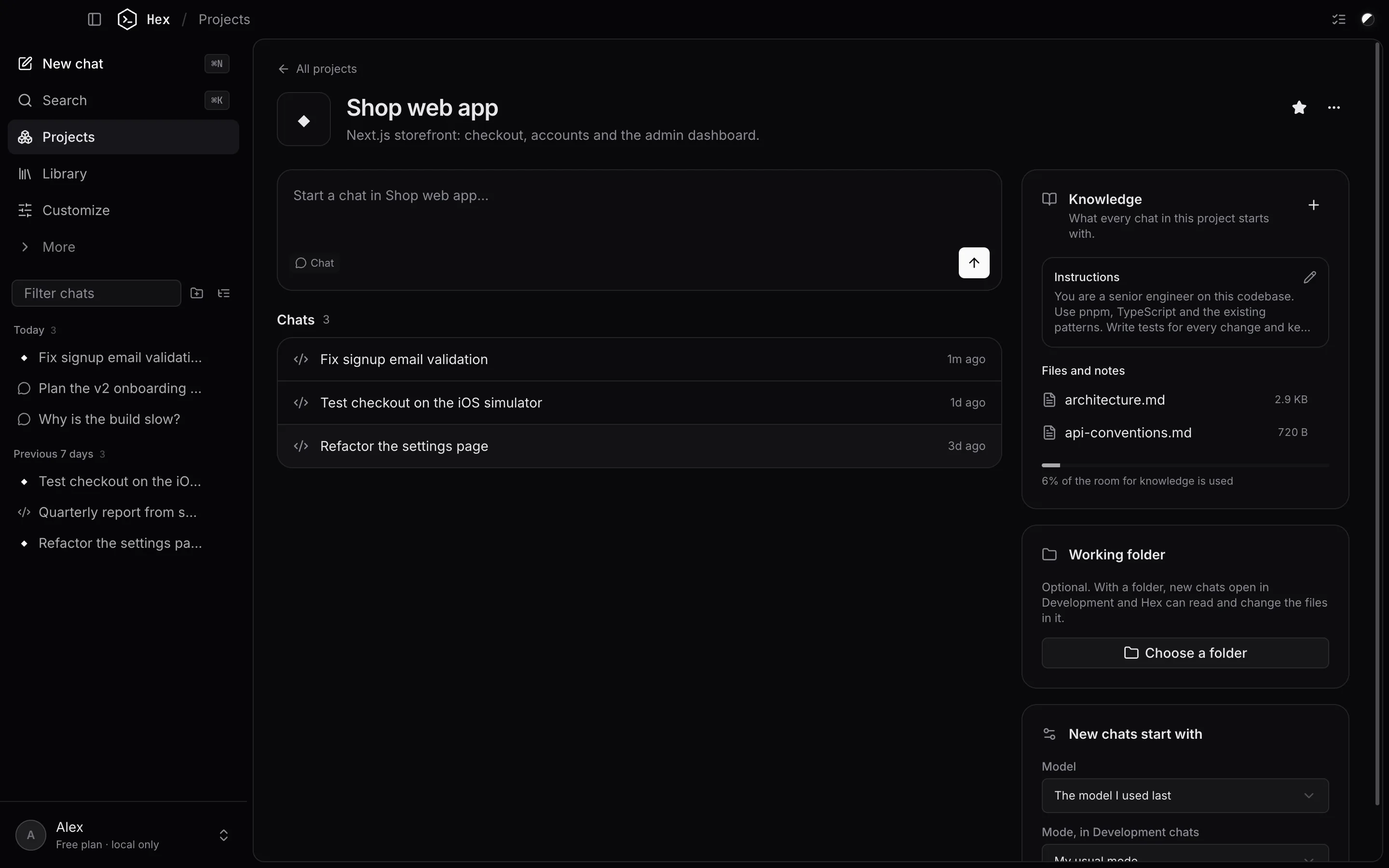
A project groups related chats and gives every chat in it the same starting context.
Create one
Open Projects in the sidebar and click New project. Give it a name, an optional description and, optionally, a working folder.
What a project holds
- Instructions: how Hex should work here, like conventions, tools and things to avoid.
- Files and notes: documents Hex should always know. Click Add files, drag text files onto the panel, or write a note. A bar shows how much of the room for knowledge they use.
- Working folder: optional. With a folder, new chats open in Hex Code and work in that folder. Without one, they open the way your other new chats do.
- New chats start with: the model, and the mode Hex Code chats use.
Start a chat from the box at the top of the project, or use New chat in project from a chat's menu.
HEX.md
If the working folder contains a HEX.md (or AGENTS.md / CLAUDE.md), Hex reads it automatically. Type /init in a chat to have Hex write one for your project.
Something unclear or out of date? Email jangidp318@gmail.com.