DocsModels & tools1 min read
Built-in models
Download a model that fits your Mac and manage it.
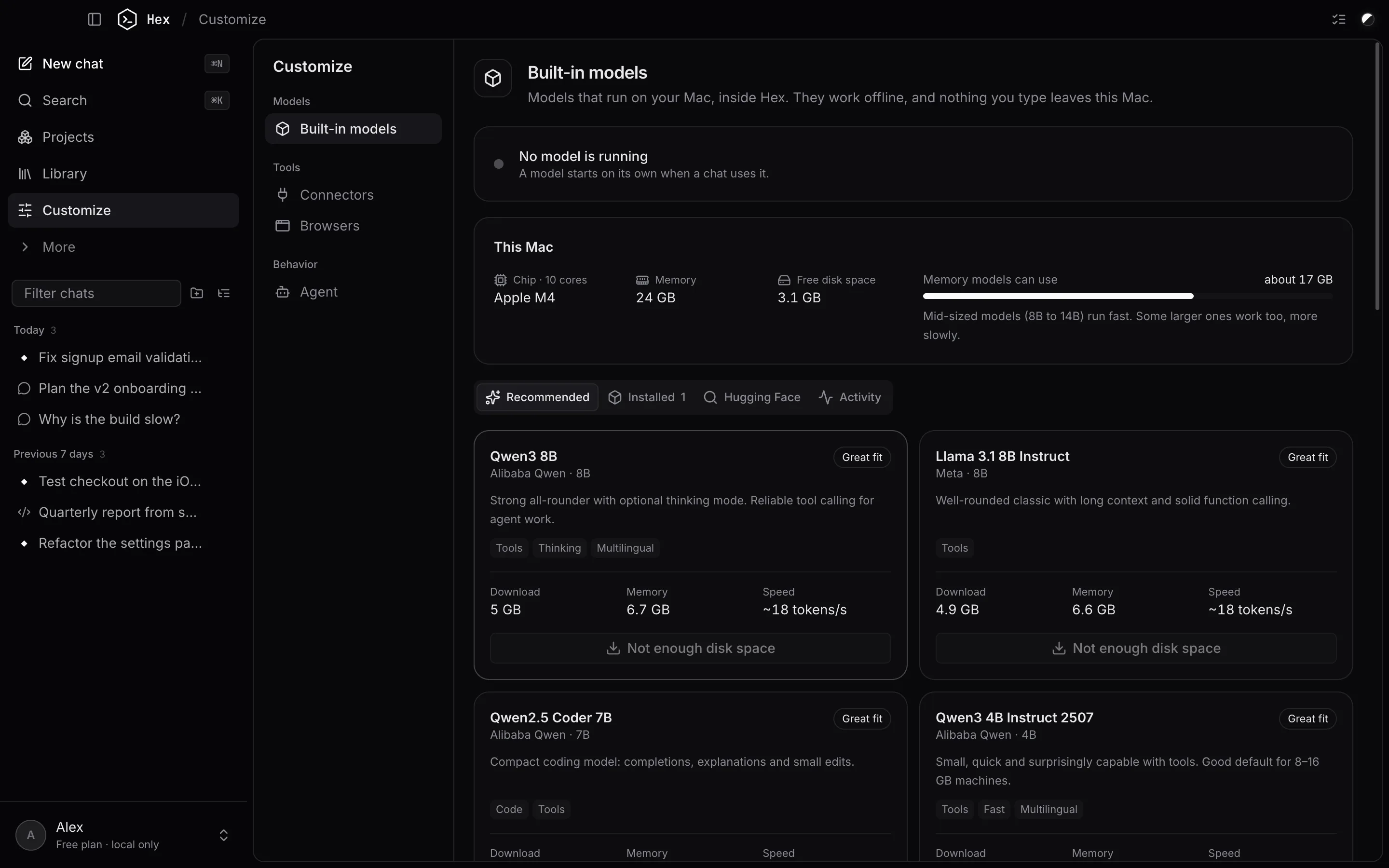
Hex runs models itself with llama.cpp, the open-source engine used by most local AI apps. Nothing else needs to be installed.
Get a model
Open Customize → Built-in models. The page shows which model is running, your Mac's chip, memory and free disk space, and how much memory models can use.
- Recommended: a curated list with a fit rating for your Mac (Great fit, Runs well, Tight fit or Too large), download size, memory needed and expected speed.
- Hugging Face: search and download any GGUF model.
- Installed: models on this Mac, with their size. Delete ones you don't use.
- Activity: downloads and recent requests.
The first time, Hex also downloads the engine for your Mac (Metal-accelerated on Apple Silicon).
Choosing a model
- 8 GB Mac: a 3B–4B model such as Qwen3 4B or Llama 3.2 3B.
- 16 GB: 7B–8B models such as Qwen3 8B or Llama 3.1 8B.
- 24 GB or more: 12B–14B models, or mixture-of-experts models like Qwen3 30B-A3B.
For agent work, pick a model tagged tools. Models tagged thinking can reason before answering.
Pick the model for a chat with the model button under the message box.
Something unclear or out of date? Email jangidp318@gmail.com.